
MERIT
Guide: CV export
With MERIT, you can export your curriculum vitae in the Fecyt formats:
- The CVN (Curriculum Vitae Normalizado)
- The CVA (Curriculum Vitae Abreviado) of the AEI or ISCIII
This guide explains how to select the information you want to include in your curriculum vitae and how to export it in the different available formats.
FECYT Curriculum Vitae Formats
Steps to follow
Content selection
- A1. Current professional position: Edit profile (Editar perfil) > Metadata (Metadatos) > Personal information (Identificación personal) + Organisational affiliations (Afiliaciones de la organización)
- A2. Previous professional positions: Edit profile (Editar perfil) > Metadata (Metadatos) > Positions (Cargos)
- A3. Academic education: Edit profile (Editar perfil) > Metadata (Metadatos) > Education/Academic qualification (Educación/Cualificación académica)
- B. CV Summary: Edit profile (Editar perfil) > Metadata (Metadatos) > Curriculum and research description (Descripción de investigación y currículum) > Profile information (Información de perfil) > Research interests (Intereses principales de investigación)
- C1. Most relevant publications in books and journals: Edit profile (Editar perfil) > Selected CVA content (Contenido CVA seleccionado) > Research Outputs (Resultados de la investigación)
- C2. Conferences: Edit profile (Editar perfil) > Selected CVA content (Contenido CVA seleccionado) > Activity (Actividades) > Conference Oral Communications / Conference Invited Lecture (conference-type event)
- C3. Research projects or research lines: Edit profile (Editar perfil) > Selected CVA content (Contenido CVA seleccionado) > Awards (Concesiones)
- C4. Participation in technology/knowledge transfer activities and exploitation of results (Patents): Edit profile (Editar perfil) > Selected CVA content (Contenido CVA seleccionado) > Research outputs – Patent (Resultados de la investigación – Patentes)
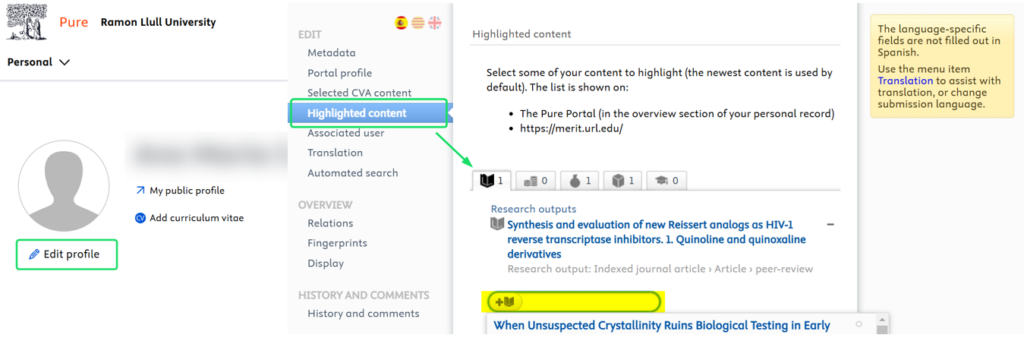
Select all the records you wish to include in Edit profile > Selected CVA content (Editar perfil > Contenido CVA seleccionado) and save your changes.
CVA export
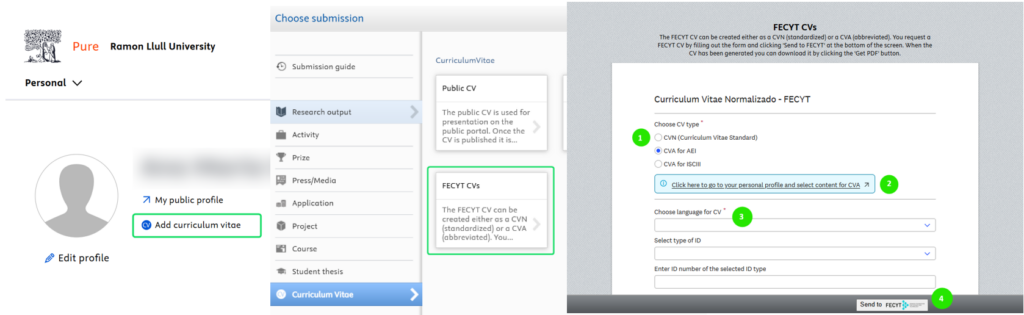
- Generate the CVA in Add curriculum vitae > CV de la Fecyt (Agregar Currículum Vitae > CV de la Fecyt). Select CV type = CVA and choose the desired language.
- Finally, select Send to FECYT (Enviar a FECYT) and wait for the CVA to be downloaded in PDF format.
Content selection
- Select the relevant publications in Edit profile > Highlighted content (Editar perfil > Contenido destacado). Search for publications by title or DOI and save your changes.
CVN export
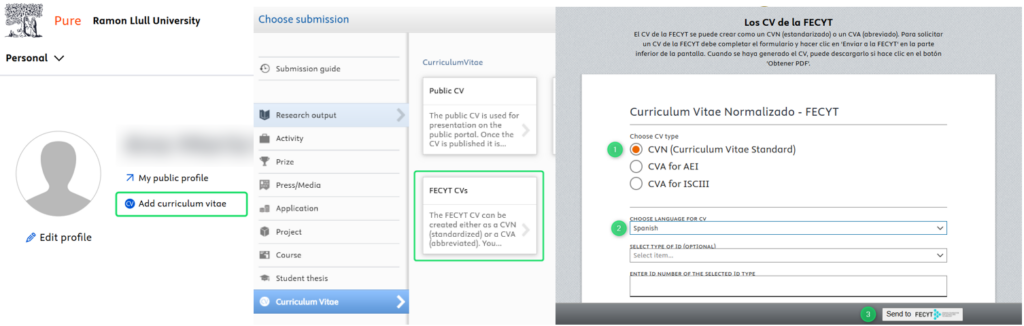
- Generate the CVN in Add curriculum vitae > CV de la Fecyt (Agregar Currículum Vitae > CV de la Fecyt). Select CV type = CVN and choose the desired language. Finally, select Send to FECYT (Enviar a FECYT) and wait for the CVN to be downloaded in PDF format.
Guides and other resources
Contact us
For further information or if you have any questions about MERIT and the export of your curriculum vitae, please contact the IQS Library team.